The EBS4 Enrolment Client User role makes the enrolments module available in Central.
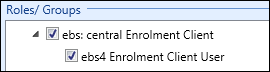
The following groups contain the additional roles for use in the enrolments module:
 EBS Central Apps/Enqs/Enrols
The roles for enrolments are located in the EBS Central Apps/Enqs/Enrols group.
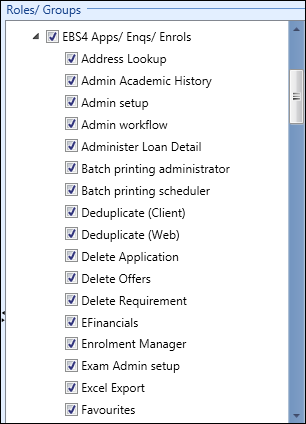
The relevant roles in the EBS Central Apps/Enqs/Enrols group are described in the following table.
| Role | Allows users to... |
|---|---|
| Batch printing administrator |
View and print all requested reports (applications, enrolments, and so on) in batch printing. Important.batch printing is available only if a valid EBS4Reports licence is held.
|
| Batch printing scheduler |
Schedule a batch of reports (applications, enrolments, and so on) for printing in batch printing. Important.batch printing is available only if a valid EBS4Reports licence is held.
|
| Enrolment Manager | Access to learner manager. A user is required to have this role in addition to any other roles in order to access learner manager. |
| Full academic history | View, add, edit, and delete academic history records on the Academic History tab in enrolments. It also allows users to add and remove optional assessments for a learner on the Manage Optional Assessments window. |
| Full attainments | View, add, edit, and delete attainments on the Attainments tab in enrolments. It also enables users to create duplicate attainments for a learner. |
| Full enrolments |
View, add, edit, and delete enrolments on the Enrolments tab in enrolments. It also allows users to do the following:
Important.A user must also have the EBS4 Enrolment Client User role to use the enrolments functionality.
|
| Learner Manager Enrolment Reports | Bulk print enrolment reports on the Enrolments tab in learner manager. |
| Manage Enrolments | Bulk edit enrolments on the Enrolments tab in learner manager. |
| Prohibit adding fees |
Users with this role cannot create any additional fees other than the default to the course. Important.This role disables the Add Fee functionality in enrolments.
|
| Run Reports |
Run reports for the corresponding module, if:
|
| Run Reports - Enrolments | Run enrolment-related reports in Central. |
| Till Administrator | Add, duplicate, and delete till number records in reference data. |
| Tills |
Save and cancel receipts in enrolments, if:
|
| View academic history | View academic history records on the Academic History tab in enrolments (read-only). |
| View attainments | View attainments on the Attainments tab in enrolments (read-only). |
| View enrolments | View enrolments on the Enrolments tab in enrolments (read-only). This role enables the Enrolments tab. |
| UK Fee super user (web) |
The role allows the user to do the following in EBS Web:
Important.The Prohibit Adding Fees role overrides the Fee Super User (web) role.
|
| UK Manage Employment History | View, add, edit, and delete employment history on the Employment window. |
| UK Manage Funding and Monitoring | View, add, edit, and delete funding and monitoring records on the Funding and Monitoring window. |
| ENG Full Loan Details |
View, add, edit, and delete loan record details for an individual learner’s enrolments in the Loan Details section on the Enrolments tab or in EBS Web. Important.This role is available only if a valid EBS424PlusLoan licence is held.
|
| ENG Manage Apprenticeship Finance | Use the Apprenticeship Finance tab in enrolments. |
| ENG Manage Work Placement | Use the Work Placement tab in enrolments. |
| ENG View Loan Details |
View loan record details for an individual learner’s enrolments in the Loan Details section on the Enrolments tab or in EBS Web (read-only). Important.This role is available only if a valid EBS424PlusLoan licence is held. The Full Loan Details role overrides the View Loan Details role.
|
| NZ Enrolment Super User | Generate or regenerate fees for an enrolment manually. |
EBS Central Fees and Payments
The roles for course fees are located in the EBS Central Fees and Payments group.
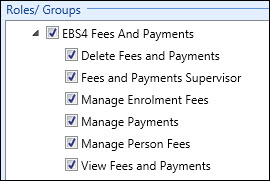
The relevant roles in the EBS Central Fees and Payments group are described in the following table.
| Role | Allows users to... |
|---|---|
| Delete Fees and Payments | Delete fees, invoices and receipts on the Payments tab in enrolments. |
| Fees and Payments Supervisor |
View, add, recast and delete instalment plans on the Payments tab in the Enrolments component. It also allows a user to do the following:
NZ Refund StudyLink receipts |
| Manage Enrolment Fees |
Add, cancel, and credit enrolment fees. It also allows users to edit enrolment-fee amounts, and cancel enrolment-fee credit. Important.The Cancel button marks the selected record as ‘CANCELLED’ rather than deleting the record completely.
|
| Manage Payments |
Manage payments on the Payments tab in enrolments in the following ways:
|
| Manage Person Fees |
Add, credit and cancel person fees. It will also allow a user to cancel person-fee credit. Important.The Cancel button marks the selected record as ‘CANCELLED’ rather than deleting the record completely.
|
| View Fees and Payments |
View the following fees and payments (read-only):
|
| NZ Manage Enrolment Invoices |
Add, cancel, and cap invoices with enrolment fees. It will also allow users to cancel cap on invoices with enrolment fees, and split invoices with enrolment fees. |
| NZ Manage Person Invoices |
Add, cancel, and cap invoices with person fees. It will also allow users to cancel cap on invoices with person fees, and split invoices with person fees. |